
| Paper Handling | ||
| Sizes | A3, A4, A5, A6, B5, Letter, Legal, Executive | |
| Scan Features | ||
| Bit depth | Colour Depth: Input: 48 Bits Colour / 16 Bits Monochrome , Output: 24 Bits Colour / 8 Bits Monochrome | |
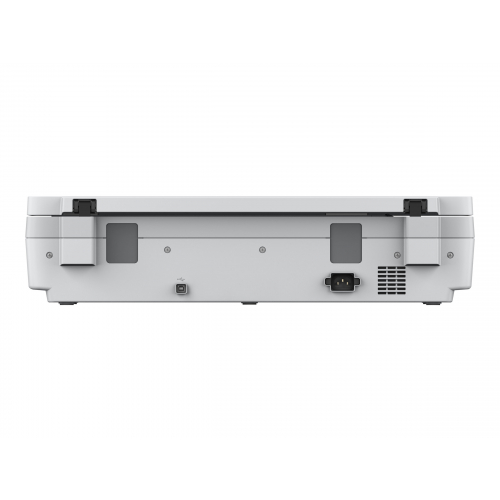
| Connectivity | Interfaces: USB 2.0 Type B, Wired Network (optional) Network Interface Panel / Unit: Optional Ethernet settings: 10BASE-T / 100BASE-TX / 1000BASE-T / Full-duplex / Half-duplex Panel type: 5-line LCD with Push Scan features Protocol support: TCP/IP, DHCP, DNS, SNMP, SLP Push scan features: Yes (with Document Capture Suite) Panel Lock with password: Yes (with Document Capture Suite) | |
| Scan Technology | Scanner type: Flatbed Scanner Light Source: ReadyScan LED technology | |
| Resolution | 600 DPI x 600 DPI (Horizontal x Vertical) | |
| Speed | Monochrome: 4 s/page – Color: 4 s/page measured with size: A3 , resolution: 200 / 300 dpi, Monochrome: 0.4 ms/row – Color: 0.4 ms/row measured with size: A3 , resolution: 200 / 300 dpi | |
| Physical Specification | ||
| Color | White | |
| Dimensions (W x D x H) | 640 x 468 x 156 mm (Width x Depth x Height) | |
| Weight | 14.8 kg | |
| Voltage | AC 100 V – 240 V, 50 Hz – 60 Hz | |
| Warranty Information | ||
| Warranty | 1 Year Warranty | |
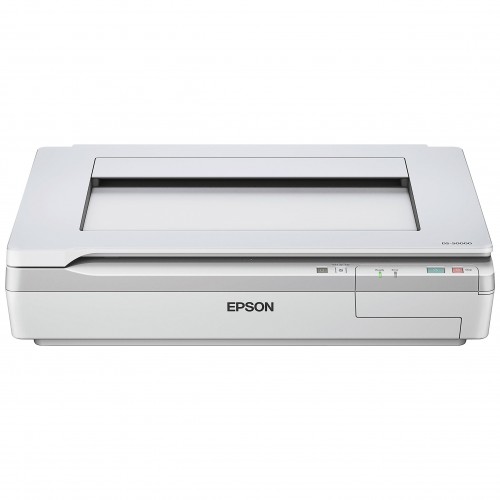
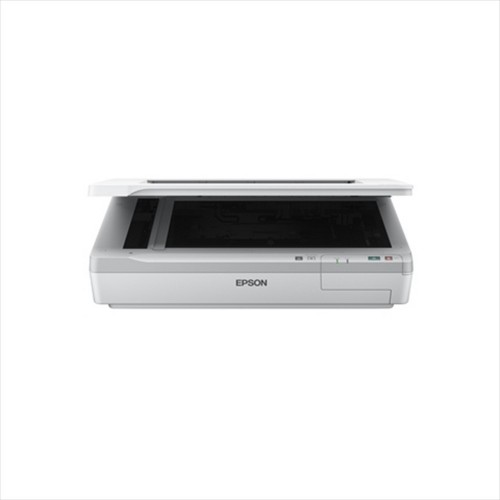
Epson WorkForce DS-50000 A3 Flatbed Document Scanner
Looking for a reliable way to digitize large documents, bound books, maps, or fragile materials? The Epson WorkForce DS-50000 A3 Flatbed Document Scanner delivers professional-grade results with its high-quality CCD technology and ReadyScan LED light source. This A3 flatbed scanner handles documents up to 11.7″ x 17″ without folding or stitching, making it ideal for offices, design studios, archives, and engineering firms that need accurate large-format scanning.
At Rosen Tech, we supply only genuine Epson products. You can verify the original specifications and features on the official Epson product page: Epson WorkForce DS-50000 Color Document Scanner. This ensures you receive a branded, authentic unit backed by proper support.
Why Choose the Epson WorkForce DS-50000?
This professional A3 document scanner stands out for its combination of speed, image quality, and versatility. The 4-line color CCD sensor (RGB + Black) captures sharp text and vivid colors at up to 600 dpi optical resolution. ReadyScan LED technology means zero warm-up time—just place your document and scan. At 300 dpi, it completes an A4 page in about 4 seconds for both color and monochrome.
Key strengths include:
- Maximum scan area of 297 × 432 mm (A3)
- Support for A3, A4, A5, Letter, Legal, and irregular sizes
- Advanced features such as book spine correction, automatic deskew, auto color detection, and edge enhancement
- Output options including searchable PDF, secure PDF, JPEG, TIFF, and multi-TIFF
- Compatibility with Epson Scan and Document Capture Pro software for easy file management, OCR, and direct scanning to cloud services or network folders
- Optional network interface for shared office use
- ENERGY STAR qualified for lower power consumption
Whether you need to scan architectural drawings, magazines, bound reports, or delicate originals, this large format flatbed scanner handles the job without damaging the source material. It is especially useful for document digitization projects where quality and reliability matter.
Who Should Buy This Scanner?
The Epson WorkForce DS-50000 suits businesses and professionals who regularly work with oversized or bound materials. Graphic designers, architects, libraries, legal offices, and educational institutions benefit from its ability to produce clean, high-resolution scans ready for editing, archiving, or sharing. If your current setup struggles with large documents or requires multiple scans and stitching, upgrading to this A3 flatbed document scanner streamlines the entire workflow.
Rosen Tech stocks genuine units so you can purchase with confidence. Explore our full range of scanners in the Scanners category for complementary options such as duplex sheet-fed models or other Epson WorkForce scanners.
Technical Specifications at a Glance
- Scanner Type: A3 Flatbed Color Image Scanner
- Optical Resolution: 600 × 600 dpi
- Sensor: 4-line color CCD
- Light Source: ReadyScan LED (instant on)
- Scan Speed: Approx. 4 seconds per page (A4, 300 dpi, color/mono)
- Max Document Size: 11.7″ × 17″
- Connectivity: USB 2.0 (optional Ethernet network panel)
- Dimensions: 640 × 468 × 156 mm
- Weight: 14.8 kg
- Supported OS: Windows and Mac
These specs confirm the scanner’s suitability for everyday professional use while keeping energy use low.
Ready to Upgrade Your Document Workflow?
Order the genuine Epson WorkForce DS-50000 A3 Flatbed Document Scanner today from Rosen Tech and enjoy authentic products, competitive pricing, and reliable after-sales support. Visit our showroom or place your order online now—our team is ready to assist with availability, delivery across Bangladesh, and any technical questions.
Call us at +8801816313131 or email rosentech.bd@gmail.com to confirm stock and place your order.
Frequently Asked Questions
What is the maximum document size the Epson WorkForce DS-50000 can scan?
It supports up to A3 size (297 × 432 mm or 11.7″ × 17″), including bound books and irregular items placed on the flatbed.
Does this scanner have an automatic document feeder (ADF)?
No. It is a pure flatbed model designed for careful handling of large, bound, or fragile documents rather than high-volume sheet feeding.
Is the Epson WorkForce DS-50000 suitable for book scanning?
Yes. The book spine correction feature and flatbed design make it excellent for scanning books and magazines without damaging the spine.
What software comes with the scanner?
It includes Epson Scan and Document Capture Pro (Windows), supporting searchable PDF creation, OCR, barcode recognition, and direct scanning to popular destinations.
Where can I buy the original Epson WorkForce DS-50000 in Bangladesh?
Purchase the authentic unit from Rosen Tech. We source genuine branded products so you receive the real Epson hardware with proper support.
Can I connect this scanner to a network?
Yes, via the optional Network Interface Panel for shared use in workgroups.


Reviews
There are no reviews yet.